


Creating an effective event program is more than just checking a box. It’s a key part of delivering a seamless attendee experience and leaving a lasting impression of your brand. For event planners and business owners, event programs can feel like another layer of stress on top of juggling vendors, speakers, schedules and logistics. But with the right approach, they can become a tool that guides attendees, promotes your brand and keeps your event running smoothly.
Why Event Programs Matter
Event programs aren’t just nice to have — they’re a critical part of the attendee experience and a strategic tool for your event. When done well, they serve multiple purposes that go far beyond listing schedules or sponsors.
Provide Clear Communication
A well-structured program ensures that attendees know exactly where to go, what’s happening and who is speaking. This clarity reduces confusion, minimizes stress and helps people make the most of their time at your event. Whether it’s a session change, a keynote speaker or a workshop location, clear communication keeps your event running smoothly and attendees engaged.
Reinforce Your Brand
Every program is an opportunity to showcase your organization’s identity. From your logo and brand colors to messaging and sponsor recognition, programs help solidify your brand in attendees’ minds. They also create a professional, cohesive look that reflects the care and attention you put into the event, reinforcing trust and credibility.
Enhance the Attendee Experience
Programs do more than convey information — they guide attendees through the event. A thoughtfully designed program helps people navigate multi-track sessions, understand timing and locate resources or networking opportunities. By reducing confusion and frustration, programs increase satisfaction, engagement and overall enjoyment.
Offer Measurable ROI
Event programs can extend your impact well beyond the day of the event. Printed or digital programs provide a platform for promoting products, services, partnerships or future events. They can include sponsor logos, advertisements or calls-to-action that continue generating value long after attendees have left, making your program a tangible return on your planning and marketing efforts.
Tips for Creating Event Programs
Creating an event program that’s both useful and polished takes planning, attention to detail and vision. Here are some practical tips to help your programs shine:
- Start Early: Give yourself plenty of lead time for content creation, design, editing and printing. Rushing at the last minute increases the risk of errors, low-quality materials or missed opportunities to incorporate sponsor or speaker information. Early planning also allows for multiple rounds of revisions, so your program can be as clear and professional as possible.
- Prioritize Clarity: A beautiful design won’t help if attendees can’t find the information they need. Organize your content hierarchically by highlighting the most important details such as times and locations first. Use color coding, headings, icons and visuals to guide readers through the program without overwhelming them.
- Know Your Audience: Tailor your program’s format, style and content to the people attending your event. A corporate conference or gala may require a sleek, formal booklet, while a creative workshop could benefit from a more visual, playful layout. Understanding your audience helps ensure the program meets their expectations and enhances their experience.
- Use Templates or Professional Designers: Templates can save time while keeping layouts consistent and professional. If your budget allows, hiring a designer can elevate your program with custom graphics, well-balanced font choices and polished visuals that reinforce your brand. Even minor design tweaks from a professional can make a huge difference in readability and impact.
- Plan for Last-Minute Edits: Changes happen as speakers switch, schedules shift or sponsors update their logos. Build in flexibility by keeping digital files ready for quick updates or using formats that allow easy adjustments. QR codes linking to real-time schedules are another great way to complement print programs and ensure attendees always have the most current information.
Download this event program planning checklist to keep every detail on track, from first draft to final approval.
Design Tips for Creating Event Programs
Good design turns an event program from a simple schedule into a tool that guides attendees, reinforces your brand and makes your event easier to navigate.

- Select a Format: The classic bifold or trifold format is simple, effective and budget-friendly, while the booklet style is ideal for full-day or multi-day events.
- Choose a Layout: The timeline layout is best for events with precise schedules, while the grid layout is great for multi-track or multi-room conferences.
- Estimate Page Count: Your event type helps determine page count — short programs for single-track events, longer booklets for multi-day conferences with maps, bios and sponsor sections.
- Integrate Digital Features: Apps and QR codes can link to schedules, speaker biographies, sponsor information or surveys.
- Mix Print with Digital: Combine physical programs with online updates for flexibility.
- Include Key Elements: Ensure that these important event details are included.
- Event title, date and location
- Welcome note or message from organizers
- Full schedule or agenda
- Speaker biographies and photos
- Maps, floor plans or navigation tips
- Sponsor logos and acknowledgments
- Contact information
- QR codes or app information
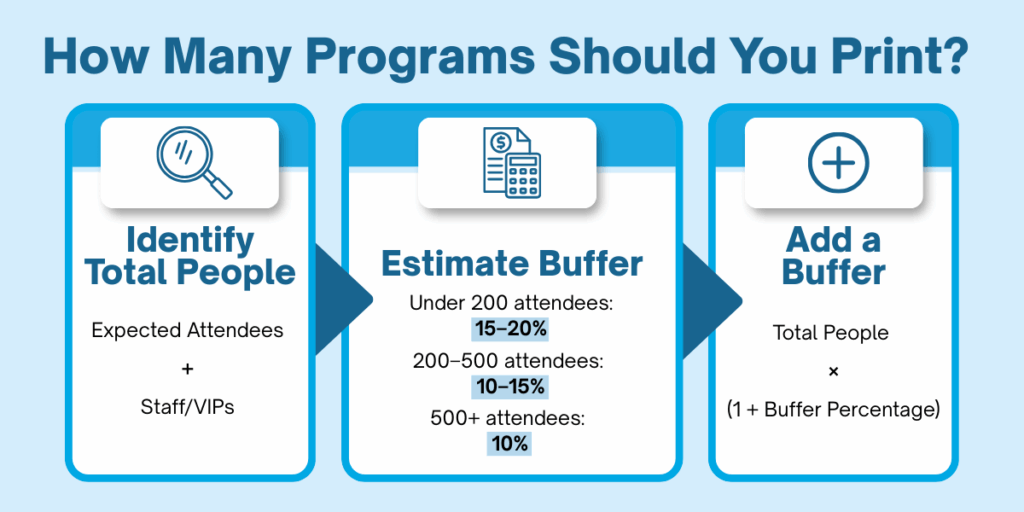
- Determine Your Printing Budget: Use this formula to calculate the number of programs to print based on past event attendance.
Frequently Asked Questions About Printing Event Programs
Q: How do I choose the right program format?
A: Consider the type and length of your event:
- Classic Bifold/Trifold: Simple, cost-effective, ideal for short events or single-track sessions.
- Booklet Style: Perfect for full-day or multi-day events with multiple sessions. Also think about your audience and how they’ll use the program — digital, print or both.
Q: What layout should I use?
A: When determining a layout, consider your needs. The timeline layout is best for events with a precise schedule, while the grid/matrix layout works well with multi-track or multi-room conferences.
Q: Digital or printed event programs? Which is better?
A: Print programs are tangible, easy to reference and allow for brand visibility through design and sponsor placements. Digital programs are flexible for last-minute updates, interactive and can reduce printing costs. Many events combine both — print for on-site guidance and digital for updates or extended content.
Q: How do I know how many programs to order?
A: Estimate your attendee count and add a buffer for extra copies, VIPs, staff and potential last-minute registrations. Partnering with a local printer can help refine the estimate based on past events and industry standards.
Q: Which paper types are best?
A: Here’s a quick guide of paper types:
- Matte paper: Professional, easy to read, resists glare.
- Glossy paper: Vibrant colors, great for photos and sponsor ads.
- Heavier stock: Feels premium and durable, ideal for multi-page booklets.
Q: What are common mistakes to avoid?
A: Common mistakes include:
- Overcrowded or confusing layouts
- Rushing the design and production process
- Ignoring your audience’s needs
- Failing to plan for last-minute changes
- Underestimating the balance between content, branding and budget
Q: How do I handle last-minute changes?
A: Keep digital files ready for quick edits, consider flexible print formats and use QR codes to link to real-time schedules. Planning ahead makes last-minute updates much easier.
Q: Should I use templates or hire a designer?
A: Templates can save time and keep layouts consistent, but hiring a professional designer can elevate your program with polished visuals, fonts and branding that make your program stand out.
Q: How can a local printer help?
A: A local printer can:
- Advise on paper, binding and finishes
- Ensure timely, high-quality production
- Help balance design, content and budget
- Offer solutions for last-minute edits or flexible formats
- Provide delivery service so your programs arrive on time and ready for your event
Ready to Start Planning?
Don’t let program planning add stress to your event. Reach out to a local printing company today to get professional guidance on creating a clear, organized and visually appealing event program that meets your needs. They can help you choose the right format and materials, handle production efficiently and deliver a high-quality program that enhances the attendee experience while reinforcing your brand.
Whether you are a small, local business, nonprofit or large organization, Target Print & Mail makes the entire event program process simple and stress-free. From planning and design to printing and delivery, our in-house design team can help you create a program that engages attendees and supports your event goals.
About Target Print & Mail
Since opening our doors in 1982, Target Print & Mail has been dedicated to providing top-quality printing services to the Tallahassee community. Over the decades, we have grown into the region’s premier provider of commercial printing, signage, mailing services, promotional products and graphic design solutions. Our team of more than 20 experienced team members operates from our 9,100-square-foot production center. We are committed to supporting our community, providing excellent service and always going above and beyond to exceed our clients’ expectations.